Project: ScheduBook
ScheduBook is a desktop address book application that can be used by students or businessmen to better manage their schedules with their peers or acquaintances. The user interacts with it using a CLI, and it has a GUI created with JavaFX. It is written in Java and currently has about 9 kLoC.
This project is a product of Software Engineering, CS2103T in NUS. ScheduBook is proudly developed by my team based on AddressBook(Level4), by SE-EDU team, initial address book application created to be used for teaching Software Engineering principles. Through this project, I gained insights on the work environment of software engineers and experienced how software engineers approach and contribute to a certain software development.
Purpose
This project portfolio provides the contributions of Melvin Leo towards this project. Furthermore, it provide insights of the implementation of certain features that Melvin implemented in ScheduBook.
Code contributed: [Functional code] [Test code]
Meeting Card
The meeting card provides you the information of the meetings that you have scheduled. As you can see from the Figure 2, the NameMeeting, DateTime, PersonToMeet, PhoneNum and Location are all shown to remind you of your certain meeting.

Figure 4.2.1: Meeting Card
Meeting Card Colours
To show you the nearing of upcoming meetings, colours are assigned to the card by comparing the date and time in the meeting class to the date and time of the log in. The meanings of the different assigned colours are:
-
darkRed: Meeting is in next 24 hours.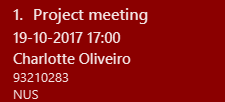
Figure 4.3.1: Dark red Meeting Card
-
red: Meeting is in next 48 hours.
Figure 4.3.2: Red Meeting Card
-
orangeRed: Meeting is in next 72 hours.
Figure 4.3.3: Orange Meeting Card
-
Creation of group meetings
-
You can create meetings with different people with their individual index from the contact list.
Meeting Cardlike Figure 6A will be created. This meeting card consists of theNameandPhoneof the person you are meeting with. You just have to scroll on thePersoninformation on the card.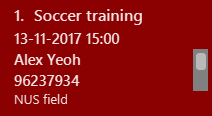
Figure 5.8.1: Meeting Cards for Group Meeting
-
Justification
For the ease of the user, the meeting cards are positioned and presented in such a way that the user can retrieve the information he/she wants immediately without much effort. The meeting cards are also sorted in chronological order so that the user can see the meetings that have higher urgency. Furthermore, the colours are also implemented for the user to keep track of his/her upcoming meetings. The name and the phone number of the person who the user will be meeting are shown so that if needed, the user can contact that person with ease. Group meeting are also easily added by adding meeting with the indexes of the person in the contact list. Users can simply scroll through the list of person in the meeting to get the names and phone numbers of the persons the user meeting with.
Implementing Meeting Class
The Meeting class is a new class just like the Person class, which resides inside model. It features commands that modifies the state of the address book
such as addmeeting, deletemeeting, editmeeting, listmeeting and findmeeting.
The attributes of Meeting class include NameMeeting, DateTime, Place, Persons and MeetingTag, as seen in the figure below.

Figure 5.4.1 Meeting Class
Persons are ReadOnlyPerson class from the contact list added by the users. In this meeting class, List<ReadOnlyPerson> personsToMeet are an object inside Meeting class which stores the information of the persons inside the class itself.
Design Considerations
Aspect: Creation of Meeting class
Alternative 1 (current choice): Input a person class in Meeting class to retrieve their name and phone number
Pros: Allows developers to be more flexible to implement with meeting class, also simplify the creation of group meetings
Cons: It is difficult to implement.
Alternative 2: Meeting class that is created with 'PersonToMeet' and 'PhoneNum' class
Pros: Easy to implement
Cons: More codes for developers to write and change.
Meeting Card
The implementation of meeting card starts of from creating 'Meeting' class which resides in the Model component of this application. This meeting card also requires the UI component for this cards to be properly shown to the users.
-
Firstly, the Meeting class is created with object properties like
MeetingName,DateTime,Place,PersonToMeetandPhoneNum. We want all these object properties to facilitate the users' ability to retrieve these information of his/her scheduled meeting. This is handled by ModelManager. -
These object properties of the meeting class are assigned to the labels in the Meeting card of MeetingCard.java, handled by UI manager.
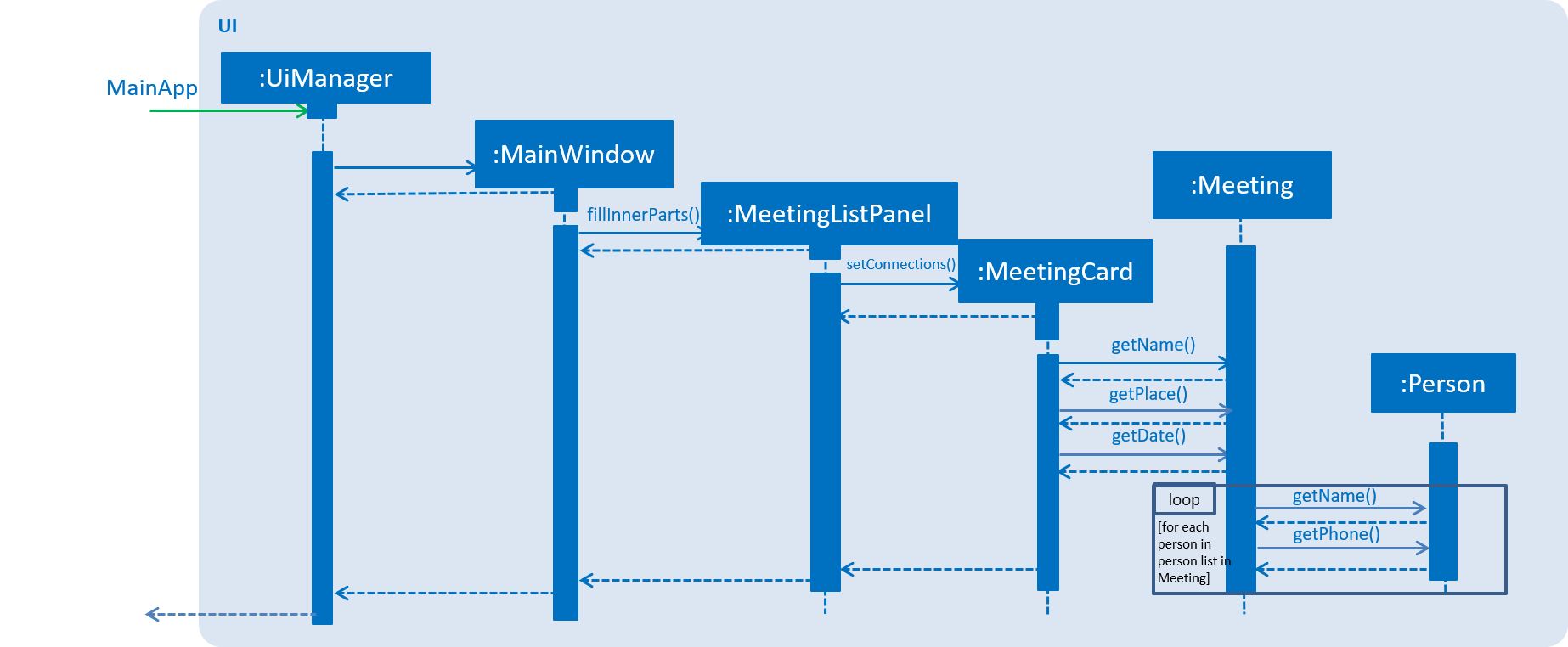
Figure 5.12.1 : Sequence diagram of Ui of Meeting Card
-
The list of meeting cards are assigned to the panel at the right of the program. The list are created with 'UniqueMeetingList'. This list of meetings are always sorted according to date and time, with the nearest date and time first. The implementation of the sorting of this
Meetingcards is by using lambda sort, where theLocalDateTimeof theDateTimeinMeetingare sorted.
Figure 5.12.2 : Meeting Card
To show the urgency of the meeting, as you can see from the examples below, colours are assigned to the card by comparing the date and time in the meeting class to the date and time of the log in.
-
darkRed: Meeting is in next 24 hours.
Figure 5.12.3 : Meeting card that due within 24 hours
-
red: Meeting is in next 48 hours.
Figure 5.12.4 : Meeting Card that due within 48 hours
-
orangeRed: Meeting is in next 72 hours.
Figure 5.12.5 : Meeting Card that due within 72 hours
Design Considerations
Aspect: Ways to be implemented as a reminder of the urgency of the meeting
Alternative 1 (current choice): Colour is applied to meeting card
Pros: Easy to implement but further developers can enhance the colors easily.
Cons: Might not be as appealing to some users.
Alternative 2 (future choice): A pop-up reminder to show meeting on the current day and with the colours applied to meeting card
Pros: Will be a better reminder to users.
Meeting Alerts
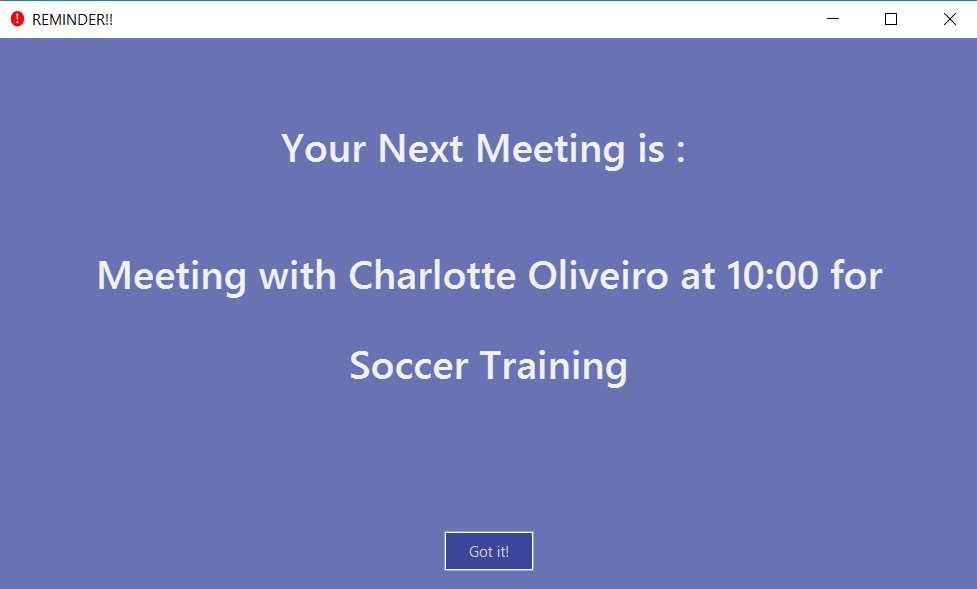
Figure 4.4.1: Pop-up Notification
-
Upon opening up the application, if there is a meeting(s) on the same day, you will be reminded via a pop-up message.
-
As shown to you in the figure above, the information regarding the next upcoming meeting is displayed in the message.
Justification
This implementation further boosts our capability of reminding of ScheduBook. After implementing the meeting cards, we realised that despite the coloured card, there was no significant reminder that can really catch the eye of the users. However, this pop-up reminder is significant to a large extent and most of the details are shown to the user. Furthermore, the user will have to acknowledge the pop up before actually entering the application.
Meeting pop up reminder
To maximise the ability to remind the users of their meetings, a pop up reminder with the details of the meetings are shown to the user. The user will just have to acknowledge it. The pop up reminder activates and provides the details of the users' next meeting in 24 hours. As you can see from the Figure 5.8.1, there are sufficient details of the next meeting and the extra button is for the user to confirm the reminder.
Figure 5.13.1 : Reminder for single meeting
Implementation:
The creation of the pop up starts if there is a meeting on the day itself by the calling of MeetingAlert class during the opening of the application. The implementation of meeting pop up reminder ultilises javafx.stage.Stage. Before the instantiation of the MeetingAlert class, there will be a check if the next meeting is a group meeting or normal meeting. Subsequently, the results will be shown on the reminder itself, shown in Figure 5.8.2.
.png)
Figure 5.13.2 : Reminder for group meeting
Design Considerations
Aspect: Ways to be implemented as a reminder of the urgency of the meeting
Alternative 1 (current choice): A pop-up reminder to show meeting on the current day, furthermore working with the colours applied to meeting card
Pros: Will be a better reminder to users and easy to implement
Cons: Might not be as appealing to some users.
Alternative 2 : Scrap the colours indicators for individual cards
Pros: Might be more appealing to some users.
Cons: Colour cards itself might not be significant enough to remind the users
Auto Deletion of Meeting Cards
Upon start up of the application, your meetings which have already passed the current time of your log in date and time will be deleted and no longer be shown.
Justification
In order for ScheduBook to be more user-friendly and convenient, automatic deletion of meetings that have past the scheduled date and time should be implemented, since there is no need for the application to remind the user of an overdue meeting.
Automatic Deletions of Meetings
Since, meetings that have been attended or missed are not needed in the meeting reminders anymore, we found a need for ScheduBook to manage the meetings and delete them, without the need for user to manually delete them.
Implementation:
When ScheduBook is being booted up, the application loads up addressbook.xml file which stores the record of the saved file from the previous boot up of ScheduBook. Hence, using LocalDateTime classes and methods, any meetings that have dates before the time the user boot up ScheduBook will not be added to the filteredMeetingList that is used to replace the pre-loaded list as you can see in the code snippet below. Hence, the newest list will not include those meetings and further saved back to the addressbook.xml file when user shut down ScheduBook.
for (final ReadOnlyMeeting meeting : meetings) {
            if (dateIsAfter((meeting.getDate().toString()))) {
            //to delete meetings that have passed automatically
                replacement.add(new Meeting(meeting));
            }
        }
private boolean dateIsAfter (String date) {
        DateTimeFormatter formatter = DateTimeFormatter.ofPattern("dd-MM-yyyy HH:mm");
        LocalDateTime currDate = LocalDateTime.now();
        LocalDateTime meetDate = LocalDateTime.parse(date, formatter);
        if (meetDate.isAfter((currDate))) {
            return true;
        }
        return false;
    }
Design Considerations
Aspect: Ways to handle meetings that have passed the scheduled date and time
Alternative 1 (current choice): Application automatically deletes all meetings that have passed the scheduled time
Pros: User-friendly, past meetings will not obstruct the user’s usage, hence being more organised
Cons: Some users might want to save some meetings that they missed
Alternative 2 (future choice) : Have an extra tabs that stores and saves meetings that user indicates to
Pros: Satisfy the need for some user to store 'missed' meetings
Alternative 3 : Let the users handle the meetings themselves
Pros: More freedom of choice, to manage the meetings
Cons: More troublesome for users, less user-friendly
Enhancement Proposed: Search command by tags
This allows user to search contact list by tags. Hence, finding person will be easier.
Enhancement Proposed: Import/export Google Contacts
To better integrate ScheduBook into our users' lives, ScheduBook will be implementing the ability to import google contacts so that users can easily sync their own contact list to ScheduBook. Scheduling meeting with his/her contacts will be much more convenient.
Enhancement Proposed: A pop-up for clashing meeting
A pop-up reminder will be opened when user adds a meeting that is within fifteen minutes of another meeting. It is just to remind the user so that he/she will be aware that there is another meeting that are near and to make changes if necessary.
Other contributions
Contribution to ScheduBook
-
Added Meeting Tags for meeting cards to indicate importance of meeting. (Pull requests #191)
-
Added Junit Test cases (Pull requests #148, #141, #202, #214)
-
Solved UI of background colour problem (Pull requests #200)
-
Created valid date regex to solve leap year bug (Pull request #187)
-
Added Coverall for whole project repo (Coverall)