Purpose
The Project Portfolio Page introduces the application, ScheduBook, and highlights the contributions that Nelson Quek Yee Jiel have done for the ScheduBook. It includes the implementation and justification for each enhancement implemented, as well as proposed future enhancements and other relevant contributions.
Project: ScheduBook
ScheduBook a desktop address book application designed primarily for University students to plan and schedule their meetings with their peers, tutors or professors. The user interacts with it using a CLI, and it has a GUI created with JavaFX. It is written in Java, and has about 9 kLoC(Lines of Code).
This project is a product of the module, Software Engineering, CS2103T, in NUS. ScheduBook is proudly developed by my team based on AddressBook(Level4), and by SE-EDU team, whose initial address book application was created to be used for teaching Software Engineering principles.
Code contributed: [Functional code] [Test code] {give links to collated code files}
Adding a meeting: addmeeting
If you need to schedule a meeting with the one of your contact in your contact list, you can add meeting with him so that the meeting will be shown at the meeting list panel and when the deadline of the meeting approaches, you will be reminded!
Adds a meeting to the address book
Format: (am)addmeeting [i/INDEXES] [n/NAME] [d/DATE_TIME] [l/LOCATION] [t/IMPORTANCE]
| Input format for Date and Time is "DD-MM-YYYY HH:MM" |
Input format for IMPORTANCE is 0-2.
|
-
Adds meeting with person at the specified
INDEX. The index refers to the index number shown in the last person listing. The index *must be a positive integer 1,2,3, … -
The
IMPORTANCEof the meeting will be :-
Most important : 2
-
Normal :1
-
Least important: 0
-
-
Creation of group meetings
-
You can create meetings with different people with their individual index from the contact list.
Meeting Cardlike Figure 6A will be created. This meeting card consists of theNameandPhoneof the person you are meeting with. You just have to scroll on thePersoninformation on the card.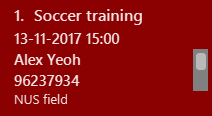
Figure 5.8.1: Meeting Cards for Group Meeting
-
-
When you are attempting to add a meeting with the same date and time as a pre-existing one in ScheduBook, the following error will be shown, preventing you from creating 2 different meetings with exactly the same date and time

Figure 5.8.2: Clash Meeting Error
Examples:
-
addmeeting i/1 n/Study d/31-10-2017 21:00 l/School of Computing, NUS t/1 -
addmeeting i/1 2 3 n/Project meeting d/27-12-2017 08:30 l/iCube Auditorium, NUS t/2
End of Extract
Justification
There is a need for users, especially University students, to properly plan their important meetings. The need becomes more apparent for
students as they are constantly occupied with enormous amount of commitments and deadlines.
Hence, it becomes tedious for them to recall each and every meeting that they might have planned ahead of time. Thus, the addmeeting feature is implemented to allow users
to create meetings effortlessly with existing contacts and to be conveniently reminded of the meeting when it is due. Users will also have the choice to flag the importance of each meeting and this would help to save time
when scrolling through the meeting list to search for urgent and important meetings. Last but not least, users will be prompted of a meeting clash whenever an attempt to add conflicting meeting arises. In conclusion, this feature
addresses the need for users to properly organize their meetings as well as getting reminders for each of the upcoming meeting.
Add Meeting
The add meeting command inherits from UndoableCommand which allows user to add meeting with the following parameters: 'INDEX' of person in the last person listing, 'Name' of Meeting, 'Date and Time' of Meeting, 'Location' of Meeting, and lastly, 'Importance' of Meeting.
Implementation:
When the addmeeting command is called with the appropriate parameters, an instance of the Meeting object is created with the
corresponding parameters. For example,
addmeeting 7 n/Shopping d/31-10-2017 16:00 l/Hillion Mall t/1Creates an object with the following parameters
MeetingName: Shopping
DateTime: 31-10-2017 16:00
PersonName: Alex Yeo
PhoneNum: 87438807
Location: Hillion Mall
MeetingTag: 1
Furthermore, the INDEX of person provided would allow the newly-created Meeting object to get the name as well as phone number
of the corresponding contact as shown in the example above.
The following sequence diagram below shows how AddMeeting operation works:
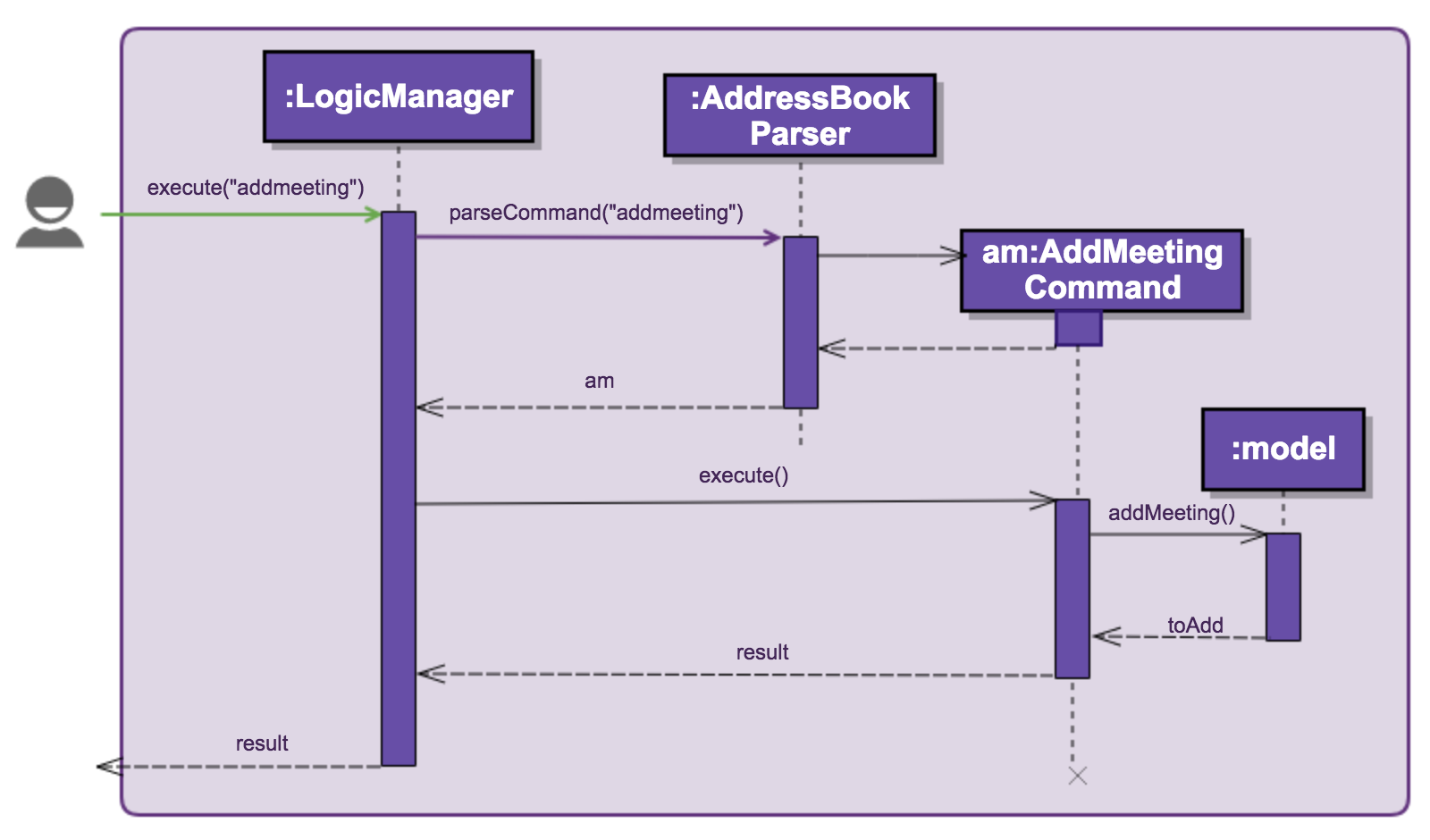
Figure 5.5.1 : Sequence diagram of Add Meeting
End of Extract
Enhancement Added: SelectMeeting command, GoogleMaps
Start of Extract [from: User Guide]
Selecting a meeting : selectmeeting
You can use this command to search for the location of your destination of the meeting on GoogleMap. From here, you can also add your current location to find out more about the nearest/fastest route to your destination.
Selects the meeting identified by the index number used in the last meeting listing.
Format: (sm)selectmeeting INDEX
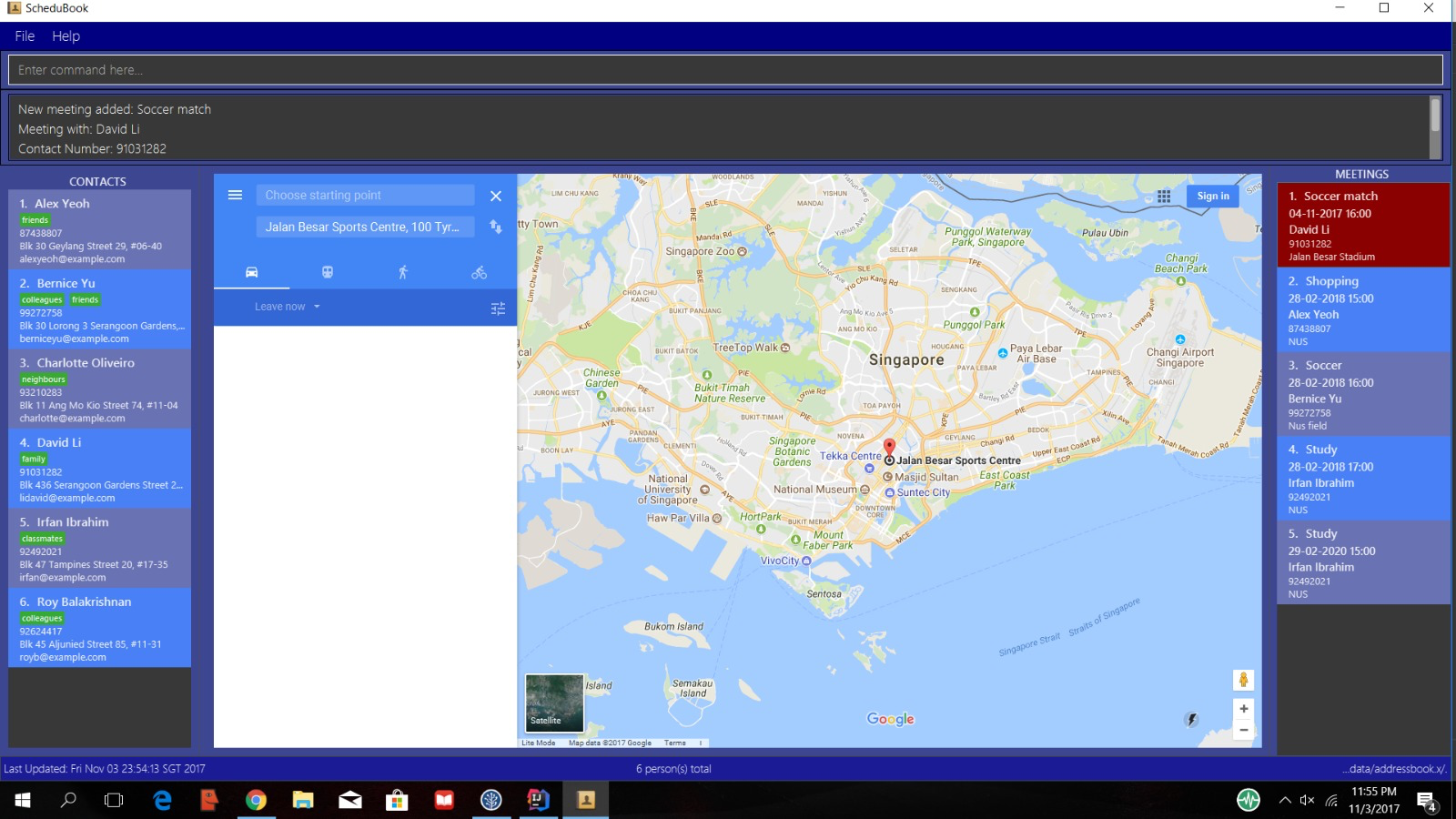
Figure 5.10.1: Google Map
Examples:
-
listmeeting
selectmeeting 5
Selects the 5th meeting in the address book. -
findmeeting Alex
selectmeeting 1
Selects the 1st meeting in the results of thefindmeetingcommand.
Loading of Meeting Location in Google Maps
Upon selecting a meeting, the location of your meeting will be automatically entered as the destination in Google Maps. You can then obtain the detailed navigational route and directions.
The screenshot below shows you the loaded Google Maps upon entering the selectmeeting command.
Figure 4.6.1: GoogleMaps
End of Extract
Justification
University Students in the modernised era often find themselves travelling to multiple locations daily to meet people for various reasons.
Thus, in order to reduce the user’s need to toggle between navigational applications and our application, Google Maps is integrated into our application for their convenience.
By using the selectmeeting command, the location of the meeting will be automatically loaded into Google Maps as the destination and all the user
needs to do is just to input their current location and the directions to the meeting location will be shown. This allows the
user to properly plan their time needed and route to meeting locations.
Select Meeting
The select meeting command inherits from Command which allows user to select a meeting with the following parameters: 'INDEX' of meeting in the last meeting listing.
Implementation:
When the selectmeeting is called with the appropriate parameters given, the Events center would create and post an instance of this as a new request event.
This request event is then handled by the Browser Panel which loads the designated meeting page, Google Maps, with the meeting location loaded into the
destination.
Design Considerations
Aspect: Purpose and use for selecting a meeting
Alternative 1 (current implementation): Google Maps is loaded in the browser panel
Pros: Allows developer to make use of the already established Google Maps.
Cons: Requires user to input valid addresses instead of user-based inputs like "Alex’s Home".
Alternative 2 (future option): Allows user to choose what to load at the browser panel such as connecting to social media platforms to interact with meeting partners
Pros: Improve flexibility and choices to suit different needs of users.
End of Extract
Enhancement Proposed: Add follow-up meetings
This enhancement allows user to continue to add on from the original meeting which keeps track and archive the previous meeting details such as location and meeting partners.
Enhancement Proposed: To drop multiple pins on Google Maps to suggest meeting location for group meetings
This enhancement allows user to make use of Google Maps’s ability to drop pins and find the most suitable meeting location for a group meeting.